WhiteHaX Harness CI CD Integration Help Guide

Developer setup for a Harness pipeline that runs WhiteHaX AI DAST after deployment

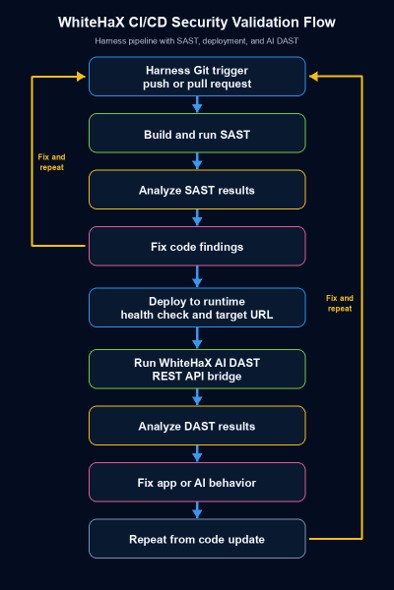
This guide takes a developer from a source trigger through SAST, deployment, a WhiteHaX runtime scan, and results review. It assumes an existing Harness project and WhiteHaX account. The companion Python example converts findings to SARIF; its live REST API adapter still requires the endpoint contract used by your WhiteHaX installation.

WhiteHaX AI-DAST GitHub CI/CD pipeline flow

Repository files and prerequisites

whitehax_scans/whitehax_tests.py whitehax_scans/requirements.txt # if the REST adapter needs packages

Copy Harness-Example-whitehax_test.py from this directory to whitehax_scans/whitehax_tests.py in the repository connected to Harness. Keep the original example until the REST adapter has been implemented and tested.

Harness access to create or edit a pipeline, source connector, trigger, secret, service, environment, and infrastructure definition.
A WhiteHaX API key, API base URL, AI endpoint, and test profile. Identify how the real API starts a scan, reports status, and returns findings.
A deployed AI application URL reachable by the WhiteHaX scan engine. The Harness runner must reach the WhiteHaX API.
A Python 3.11 runtime in the post-deploy step; install only the packages used by the completed adapter.

Configure Harness credentials and target inputs

  1. In Harness, open the project and create a text secret named WHITEHAX_API_KEY. Limit access to the pipelines that need it. Do not put the key in pipeline YAML, command arguments, or logs.
  2. Add WHITEHAX_URL as a project or pipeline variable containing the WhiteHaX API base URL. It is distinct from TARGET_URL, which points to the deployed AI application.
  3. Define TARGET_URL as an explicit runtime input or output from the deployment stage. Use the URL of the running application, including scheme and host. Confirm it resolves and is reachable before scanning.
  4. For a local or private target, use a runner or network path that reaches the WhiteHaX API, and confirm the WhiteHaX scan engine reaches the application. localhost in a hosted runner refers to that runner.
Create the trigger and source checks
  1. In Pipeline Studio, create or open a pipeline and connect the source repository. Add an enabled Git push trigger for the release branch and, if appropriate, a pull request trigger for early SAST checks. Verify event and branch filters.
  2. Add a Build stage with code checkout, unit tests, and the chosen SAST scanner. Set the SAST threshold according to release policy. A failed Build stage should stop deployment.
  3. Commit code fixes and rerun the trigger until the SAST gate passes. Keep the scan result tied to the source revision.
Deploy and pass the runtime URL
  1. Add a Deploy stage after Build. Select the Harness service, environment, and infrastructure definition that match the staging or approved runtime target. Configure the normal rollout and rollback strategy for that environment.
  2. Add or use a post-deployment health check. Pass the actual deployed application URL into TARGET_URL for the next stage. Do not assume an AWS deployment status event exists in Harness.
  3. Make the WhiteHaX stage depend on successful deployment and health check. If deployment fails, the WhiteHaX scan must not run against an older endpoint.

Add the WhiteHaX Run step

  • Add a post-deploy Build stage with a Python 3.11 image and repository checkout. Add a Run step. Choose infrastructure with network access to the API and target path.
  • In the Run step Environment Variables, map WHITEHAX_API_KEY to <+secrets.getValue("WHITEHAX_API_KEY")>, WHITEHAX_URL to its variable, and TARGET_URL to the deployment output or runtime input.
  • Set the Run step command and timeout. The command below expects the Python example at the repository path shown in section 1.
whitehax_scans/whitehax_tests.py \   --target-url "$TARGET_URL" \   --output whitehax_results.sarif

A scan adapter failure exits with code 2 and writes no success report. Set the timeout above the real scan polling limit. Avoid echoing credentials or full response bodies in logs.

Implement the WhiteHaX REST adapter

  • In fetch_whitehax_findings(), implement authentication, scan submission, bounded polling, failure handling, and finding retrieval using the API contract for your WhiteHaX tenant. Return a list of dictionaries with id, title, description, severity, and uri. Keep stable rule IDs and do not report a failed scan as an empty successful scan. Before enabling live use, test report conversion with an exported findings array:
  • Before enabling live use, test report conversion with an exported findings array:
whitehax_scans/whitehax_tests.py \ --target-url https://staging.example.com \ --findings-json exported-findings.json \ --output whitehax_results.sarif

Publish and review the result

  • Retain whitehax_results.sarif with a Harness artifact publishing step or shared path. The Run step alone does not publish findings to Harness STO.
  • If the project has Harness Security Testing Orchestration, add a SARIF ingestion step and configure target type, report path, and shared path in its UI. Validate ingestion using a real report before using STO severity gates.
  • Start in report-only mode, review severity mapping and false positives, then choose a blocking threshold. Keep scan execution failure separate from findings that exceed a threshold.
  • Fix application or AI behavior, commit the change, and rerun the pipeline from the source trigger.

Validation and troubleshooting

  • Trigger does not fire: check enabled state, webhook delivery, repository, branch, and event filters.
  • WhiteHaX step starts too early: verify stage ordering and successful deployment conditions.
  • Wrong target scanned: print the nonsecret TARGET_URL and compare it with the deployed environment.
  • Connection failure: check runner to API connectivity and scan engine to target connectivity separately.
  • No report: check adapter exit code, polling timeout, output path, and shared path or artifact publishing step.
  • STO shows no findings: confirm STO is enabled, SARIF 2.1.0 ingestion is configured, and the file is accessible to that step.

Better accountability

Pipeline components  https://developer.harness.io/docs/continuous-integration/use-ci/prep-ci-pipeline-components/

Build and Run step examples  https://developer.harness.io/docs/continuous-integration/development-guides/ci-dotnet/

Pipeline stages  https://developer.harness.io/docs/platform/
pipelines/add-a-stage/

SARIF ingestion support  https://developer.harness.io/docs/security-testing-orchestration/whats-supported/scanners/